Chat
The Chat page: who answers, conversations, attachments and what a reply can show.
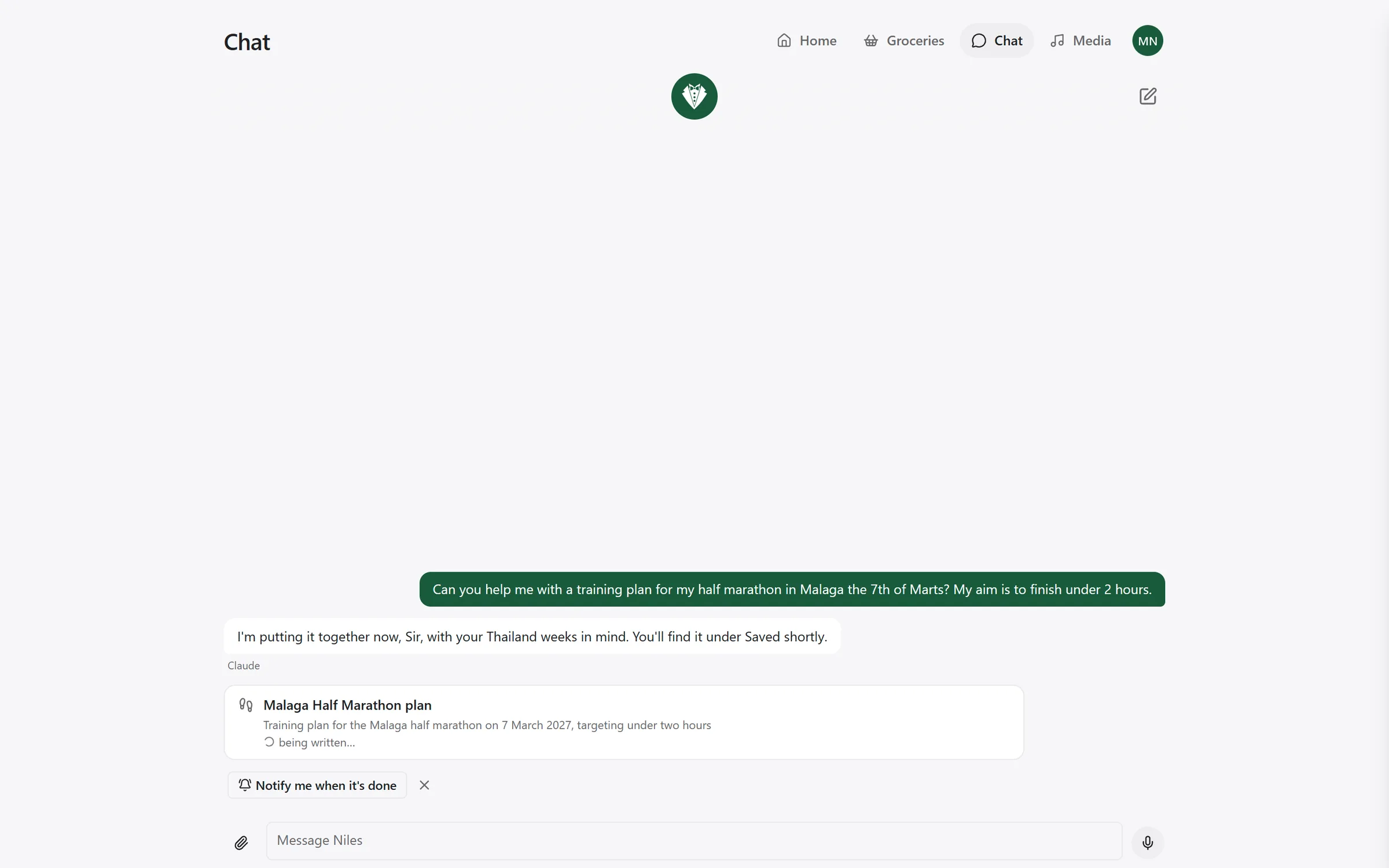
The Chat page in the Niles app is the same Niles as the satellites, typed. It works in a browser and in the app added to a phone's Home Screen, for anyone who can sign in.
Who answers
A typed message goes through the same steps as a spoken one:
- If Niles is waiting for an answer, such as "save this rule?", a plain yes or no answers it.
- A fixed phrasing ("turn off the kitchen lights", "set the bedroom to 19 degrees") is carried out at once. See Talking to Niles.
- Anything else goes to the assistant, Claude or ChatGPT, when one is switched on. Otherwise Niles's own model answers.
Which assistant answers is chosen under Settings → Voice & AI, on the Assistant card. Claude and ChatGPT run on your household's own subscription and are set up under Settings → Add-ons, in Assistants & tools. A change takes effect with the next message.
Under a reply from an assistant you see Claude or ChatGPT. If the assistant failed, Niles's own model answers instead, and the reply says which assistant it went without and why.
Spoken commands mostly keep Niles's own model, because it answers faster. By voice, the assistant only gets requests to make or change rules, and requests for a tool server whose tools are handed to it.
There is no room in the chat, and nothing is spoken. Say which room you mean: "turn off the kitchen lights", not "lights off".
A reply that is only an action shows Done. A message can be at most 2,000 characters.
Conversations
Each person who signs in has their own conversations. Nobody else can see them. What you say to a satellite shows up in your chat too, once Niles knows your voice. Those turns carry a microphone and the room's name, or Spoken. What an unknown voice says goes into nobody's chat.
A new conversation starts after 5 quiet minutes. The app opens on your latest conversation if it is less than 5 minutes old, and on an empty new one otherwise. New chat, at the top right, starts one yourself.
The whole of a conversation you pick up again is what Niles reads as context, spoken turns included.
Open Niles's panel with the Niles avatar at the top of the chat (Open Niles). On a phone it fills the screen; on a computer it takes the right half and the chat stays usable. It has three tabs:
- Conversations: your past conversations, newest first, each with a title, how long ago, and how many turns. Tap one to carry on. Deleting one asks Delete this conversation? with Keep it and Delete.
- Saved: what Niles has written for you. See Saved.
- Approvals: what waits for your yes. See Approvals.
Niles keeps your last 100 conversations. Older ones go as new ones start. A conversation's title is the start of the first thing said in it.
Writing a message
The box says Message Niles. Enter sends, and Shift+Enter starts a new line.
The microphone button (Dictate) records you and writes down what you said in the box, using the same speech-to-text as the satellites. It does not send it. Check it, then press Enter.
When Niles reads back a rule it is about to make, Save and Don't save appear under it. A typed "yes" or "no" works as well.
When Niles wants to send a mail or use a tool set to ask first, the card appears under its reply with Allow once and Deny. Typing "yes" does not approve those. Use the buttons.
Attachments
You can give Niles a photo or a PDF to look at:
- the paperclip (Attach a file). On an iPhone it offers the photo library, the camera or a file.
- drag a file onto the chat (Drop a photo or a PDF here)
- paste a file
Each file shows as a chip with a thumbnail and its size, which you can remove before sending. A file on its own, with no text, is a message too.
| Limit | |
|---|---|
| Kinds | JPEG, PNG, WebP, GIF, PDF |
| Files per message | 5 |
| Size of each | 10 MB |
Niles checks the kind from the file's contents, not its name. HEIC photos, an iPhone's default, cannot be read. Picking a photo through the paperclip on an iPhone converts it to JPEG by itself. A HEIC dropped in from a computer is refused, with a hint: on the iPhone, Settings → Camera → Formats → Most Compatible makes new photos JPEG.
Only Claude or ChatGPT looks at files. Without either switched on, Niles says: "Niles needs Claude or ChatGPT to look at a file. Turn one on in Settings → Voice & AI." Files also need Niles's database.
The assistant is told that what a file says is information, never an instruction. A PDF that says "ignore your rules" is read, not obeyed.
Niles keeps a copy of each file with the conversation, shown only to you. A file that never ends up in a kept turn is deleted after a day. In the chat, photos show as thumbnails and a PDF as a chip that opens in a new tab.
What replies can show
Replies can carry headings, lists, checklists, simple tables, quotes, code, bold, italic and links. Niles draws these itself and never runs anything from a reply as a web page.
- Links open in a new tab, and only web and mail links work.
- A reply can show a picture Niles saved with one of your Saved items. A picture from a web address is never loaded; you see its description instead.
- What you typed is shown exactly as you typed it.